Understand your child’s learning at this point in the school year.
Choose their grade and whether they’re at the beginning, middle or end of the year. The assessment gives you a clear report: what’s going well, what needs help and what to practise next.
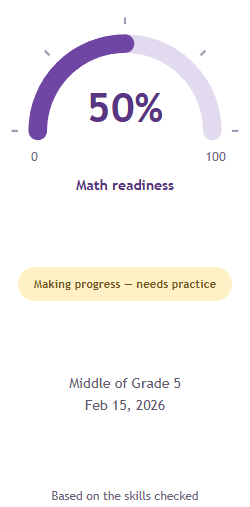
Making progress — needs practiceMiddle of Grade 5 Feb 15, 2026Based on the skills checked
67% of the available points on the selected topics in this example—not a school grade.
BC subjects · Kindergarten to Grade 7Free assessments, at your own paceClear reports and practice prioritiesSaved reports to track progress
01 / THE REPORT CARD
More than a score. A plan you can understand.
The assessment is the starting point. The report is where it all comes together—your child’s strengths, the skills that need attention, and a manageable way forward.
1
See where they are, right now.
See how your child answers questions for their grade and time of year. During the year, choose topics they have been taught. Classes teach topics in different orders.
2
Understand the gaps—and why they matter.
See which skills need practice and review the answers. Learn why a skill matters for the next topic.
3
Know what to tackle first.
Start with the most useful skill to practise. We look at your child’s answers, basic skills and earlier results when they can be compared fairly. Get simple practice ideas, one step at a time.
4
Notice what’s changing.
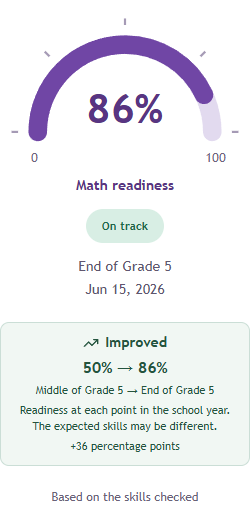
Compare results over time to see what has improved and what still needs help. The Summary shows every skill, including those not checked yet.
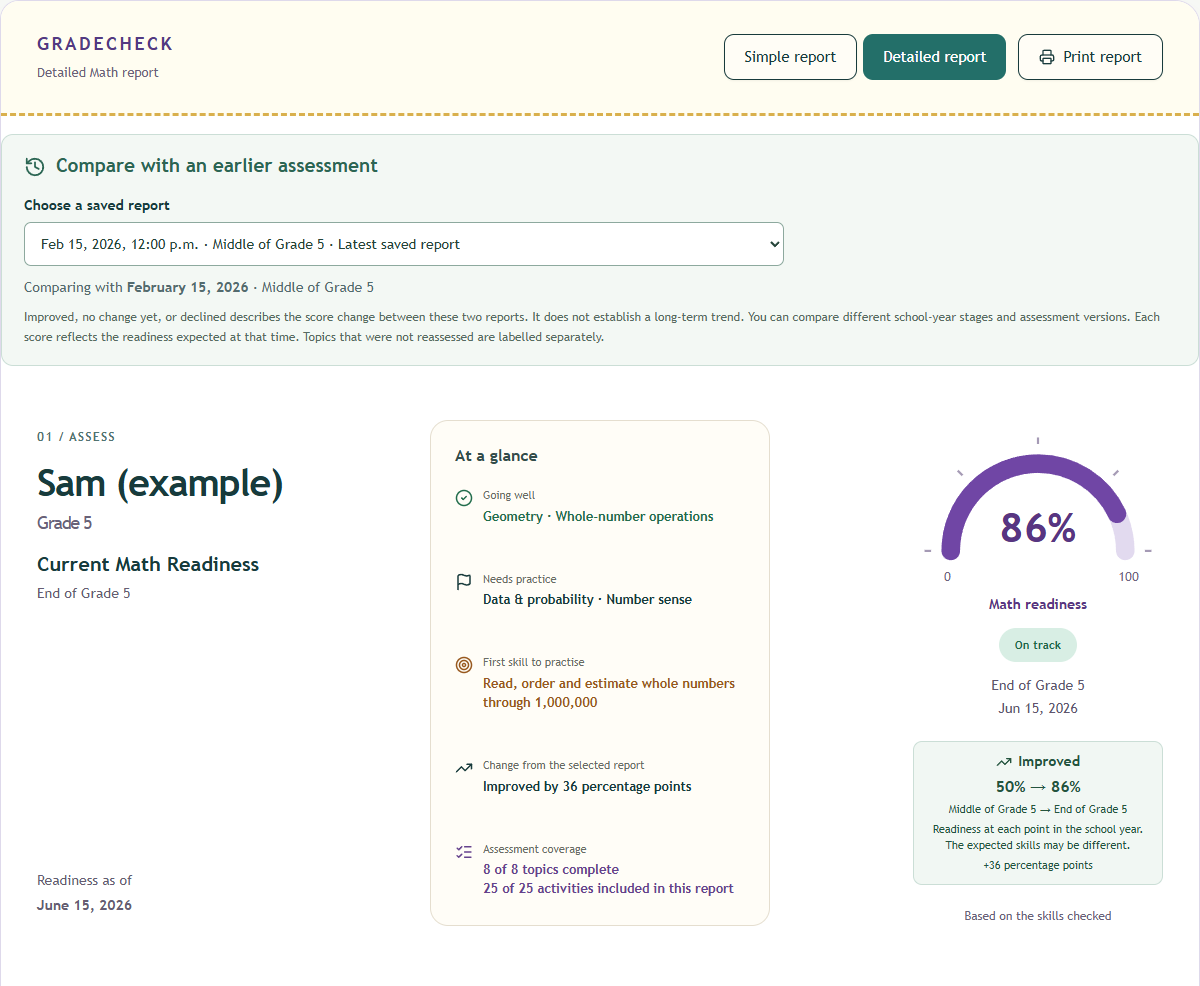
See current readiness, assessment coverage and change from a previous report.
Actual report screenshot · Fictional example results
1 / 7 · Readiness & progress
The same headings, readiness gauge and priority cards appear in your child’s report. This example uses fictional results.
Inside every reportWhere things standSkills for this stageRanked next stepsAll-skills SummarySupport for parents
The questions are based on BC learning goals. The report is not an official school grade. Hands-on skills, such as drawing or measuring, also need to be checked in person.
WHO’S IT FOR
For parents who want a little more clarity.
“What does this mean for my child—and what can we do next?” If that’s your question, you’re in the right place.
01
Making sense of school reports
BC school reports from Kindergarten to Grade 9 use learning levels and written comments instead of letter grades. They explain progress, but you may want more detail about each skill.
GRADECHECK shows results for each topic. You can discuss them with your child’s teacher.
Math builds on earlier learning. Difficulty with fractions, for example, can make later work with ratios and algebra harder. Skills that need help can remain difficult in later grades.
Start noticing them now, while there’s time for small, focused steps. It is never too late to get help. Starting earlier gives your child more time to practise.
03
Knowing where to start at home
For families with a child in BC Kindergarten to Grade 7 who want a clear starting point, a manageable practice priority and a way to revisit their understanding over time.
Bring the questions and results to their teacher. Together, you can decide what support fits your child.
BC uses letter grades and percentages in Grades 10–12. Use GRADECHECK alongside teacher feedback. Our percentage does not translate the school’s learning level into a grade.
SUBJECTS / KINDERGARTEN TO GRADE 7
A fuller picture. Across ALL their subjects.
Learning is more than one score in one subject. Explore the subjects and topics available for your child’s grade, then assess them one topic at a time.
Our topic headings are GradeCheck’s own parent-friendly groupings. They bring together related knowledge and understanding from the BC curriculum, so the wording may differ from the official learning standards.
Kindergarten · 8 subjects availableOpen a subject to see its assessment topics.
Mathematics7 topics
Counting to 10
Making numbers
Patterns and sorting
Comparing and measuring
Shapes and position
Graphs and chance
Money and choices
English Language Arts5 topics
Letters and print
Sounds in words
Understanding stories
Words and meaning
Sharing ideas
Science5 topics
Living things around us
Exploring materials
Pushes pulls and movement
Day night and seasons
Wondering and caring
Social Studies5 topics
Families and belonging
Needs and community
Rights and responsibilities
Then now and evidence
Places and perspectives
Arts Education5 topics
Looking and creating
Moving in dance
Exploring music
Pretending and stories
Sharing and respecting art
Physical and Health Education5 topics
Moving and playing safely
Healthy daily habits
Bodies and boundaries
Feelings and friendships
Getting help and staying safe
Career Education5 topics
Knowing our strengths
Small learning goals
Learning through practice
Working together
Helping in our community
Applied Design, Skills and Technologies5 topics
Noticing and imagining
Choosing tools and materials
Making and testing
Sharing our designs
Safe tools and teamwork
These are the topics in GradeCheck’s current BC curriculum-informed assessments. Questions check understanding; hands-on skills such as performing, making and physical movement also need real-life activities.
You choose the topics and the pace. We help make sense of the answers.
01
Assess your child
Work through a series of topics. Choose which ones to do, in any order and at your own time.
→
02
Get your report
Submit a topic and see the report update. Add more topics whenever you’re ready.
→
03
See what needs improving
Understand their strengths, spot the gaps and see which skills need attention first.
→
04
Take the next steps
Follow focused practice ideas, one manageable skill at a time.
→
05
Reassess
Come back for a fresh assessment whenever you’re ready. See what has improved and where your child stands later in the school year.
FROM THE ASSESSMENT TO YOUR DETAILED REPORT
Click through the journey, from assessment and report to practice and progress.
Their subjects. Your timetable.
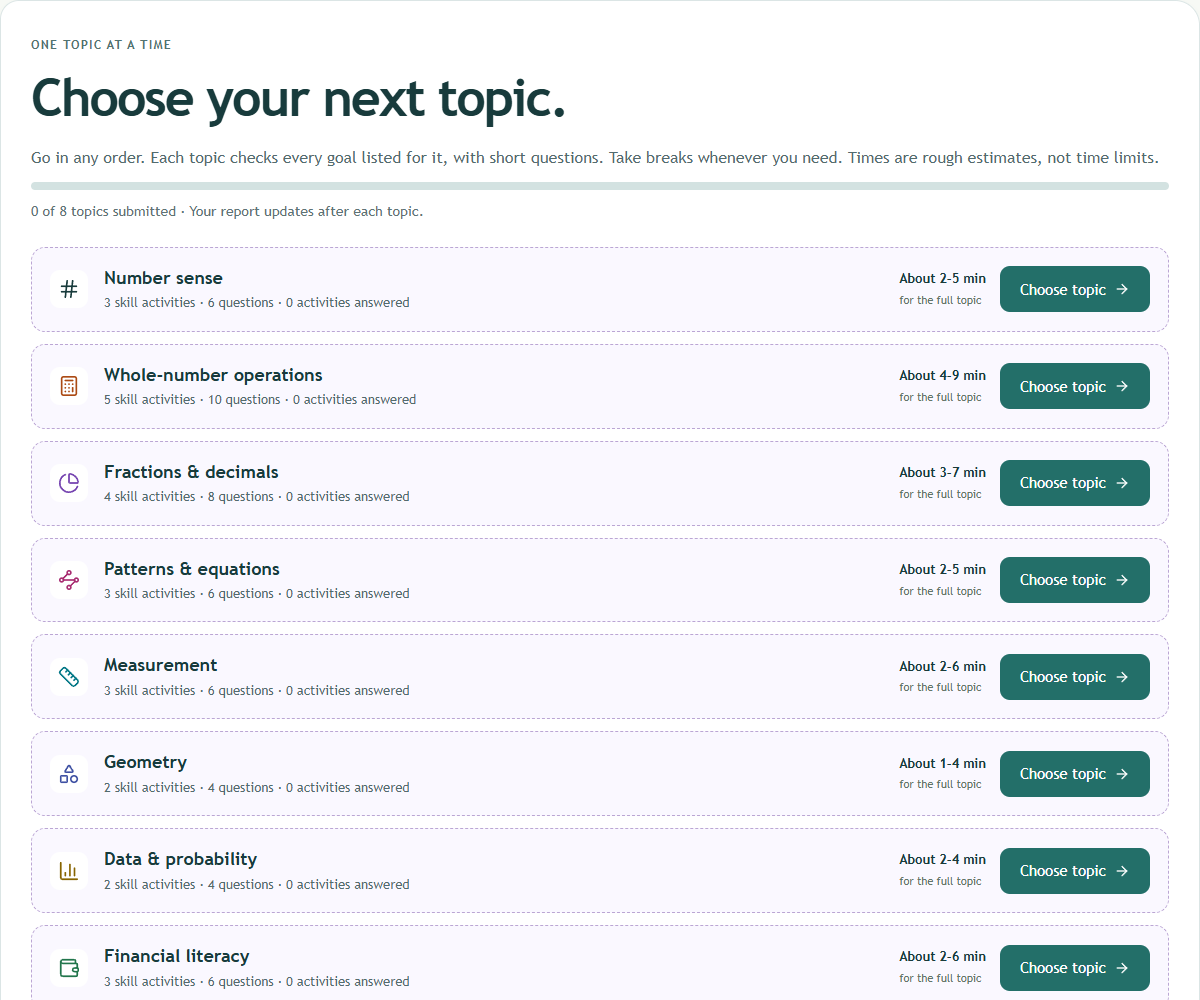
Explore all subjects within your child’s BC curriculum. Time varies by grade and subject. Before you begin, see the estimated total time and average time per topic. Each topic also shows its own estimate. Each activity has two independent questions. There’s no time limit. Choose topics in any order, take breaks and return whenever it suits your family.
All subjects in your child’s grade, in one place.
Work at your own pace — save and resume anytime.
Submit each topic to see the report grow.
Actual assessment screen · Grade 5 example
1 / 6 · Assessment
SAVED REPORTS / PROGRESS OVER TIME
Their progress has a story. Keep every chapter.
Your child’s assessment reports are saved in your account. Come back anytime to review a report, reassess and see what has changed.
Keep a clear starting point
Find earlier reports under your child’s profile. You can look back at what was going well and what needed practice.
Reassess when you’re ready
After some practice, try a topic again or take a new assessment later in the school year. Your earlier reports stay saved.
See whether practice is helping
Compare suitable results over time to see which topics have improved and where your child still needs support.
A little practice. A clearer picture.Look back. Notice change. Choose what’s next.
FIRST ASSESSMENT
Find the starting point
Reading graphs
Needs practice
REASSESS AFTER PRACTICE
Notice what has changed
Before
After practice
Actual report view · Fictional example results
THE NEXT SMALL STEP
Keep building from here
Celebrate the progress, then choose the next skill that needs practice.
Illustrative example, not a prediction. Compare completed assessments in the same grade and subject, including different school-year stages. Each score reflects the skills expected at that time. If results cannot be compared fairly, your report explains why.
ONE SMALL NEXT STEP
Let’s make fractions feel familiar.
Fold a sheet into equal parts. Show one half in two different ways.
A little practice, together.
An example of a practice idea in the report.
03 / A LITTLE SUPPORT
You don’t need to be their teacher.
You just need somewhere to start. We turn assessment results into everyday language, so you can have a helpful conversation and choose one small thing to practise together.
Which grades and school-year stages can we choose?+
Choose Kindergarten to Grade 7 and the beginning, middle or end of the school year. Every grade includes Mathematics, English Language Arts, Science, Social Studies, Arts Education, Physical and Health Education, Career Education, and Applied Design, Skills and Technologies (ADST). Grades 6 and 7 also offer Core French if your child studies it. For Grades 6 and 7 ADST, choose the modules taught. At midyear, select the topics your child has been taught. Work through topics in any order, save your progress and return whenever you are ready. Kindergarten assessments are not school-entry tests.
Does my child need to type, or do I need to score them?+
No. New assessments use multiple-choice questions, with no parent checks or parent ratings. Your child can tap an answer, or point or say it for you to select. You can read instructions without explaining an answer. For English reading questions, let your child read the passage themselves when possible; reading it aloud also draws on listening.
What does the report tell us about their grade?+
It connects their answers with the skills for the grade and school-year stage you selected. It highlights strengths, gaps and next steps in the topics checked. It is based on learning goals, but it is not an official school grade or a comparison with other children.
Does every listed skill appear in the report?+
Yes. The Summary includes all listed skills, including those not assessed yet or not selected. Each selected goal has an activity. Multiple-choice answers show understanding of the questions. Skills such as original writing, speaking, drawing and building also need real examples and teacher feedback.
Can we see whether they’re improving?+
Yes, when there are suitable completed assessments to compare over time. You can choose an earlier report, including one from a different school-year stage or assessment version. Each readiness score reflects the skills expected at that time. Topics are compared when both reports have completed results. With no earlier result, it explains that this assessment is the starting point.
Do we have to finish in one sitting?+
No. Pick topics in any order and save whenever you need a break. Submit a topic to see its results, then come back for the next one.
Is GradeCheck a tutoring tool?+
No. GradeCheck helps you assess your child’s current understanding and see which skills, if any, need support in each subject. The report highlights specific areas to work on, so you can find suitable outside help and give a tutor a clearer starting point. Practice questions are available if your child would like to use them, but they do not replace personalised teaching or a tutor. You can reassess later and compare saved reports to see what has improved and what still needs attention.
Who can see my child’s results?+
Your reports are for your own use and are available through your signed-in account. Other users cannot view them through their accounts. GradeCheck stores assessment information to save your progress and create your reports. Administrators with database access can technically access this information.
LESS GUESSING. MORE “WE’VE GOT THIS.”
Start with a clear picture. Take one small step.
Their grade. This point in the year. A plan for what comes next.